


How to Change Your Voyant Greeting for the Holidays.
- Posted by: Adriene Hall

- Dec 5, 2019
- 2 min read
Don’t change your greeting until the day before or the day of the holiday. The holiday greeting file is stored in the “After Hours” menu. If someone calls after you’ve selected the holiday greeting, the “After Hours” greeting will play, whether it’s your holiday greeting or normal “After Hours” greeting. Only one greeting can be selected at a time.
1. Record and save your holiday greeting file to your desktop.
Note: You can use the BroadSoft Recorder app to record your greeting. It’s available for IOS and Android. Remember, your file must be in a .wav format. After you’ve recorded your greeting, you can email it to yourself and save to desktop.
2. Go to http://vip.anpi.com and log into your account
3. Click on “Enterprise Services”

4. Click on “Auto Attendant”

5. On the right-hand side of screen, click the “Edit” icon.

6. Click the “Edit After Hours” button

7. A new window will pop up. Click “Browse”.

8. Click “Upload File”.

9. Find the .wav file you saved on your desktop, highlight, and click “Open”.

10. After your file has uploaded, select from the list and click “Save”.

Note: When the holiday is over, be sure to come back and select your regular After Hours greeting in this menu.
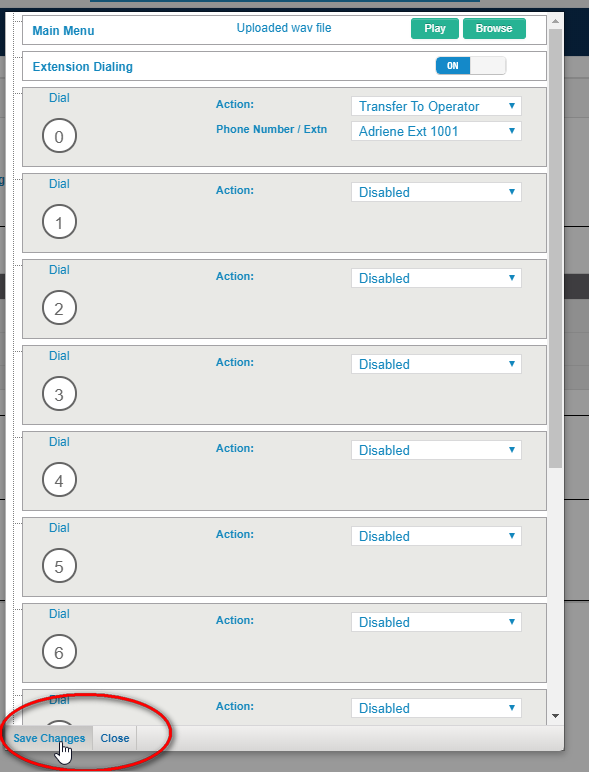
11. The window will close automatically. On the following window, click “Save Changes” then “Close”.
12. Now it’s time to set the schedule for your holiday greeting. Back on the original menu, click “Schedules” (located under Enterprise Services.)

13. Click on “Global Schedules”.

14. Click on the “Edit” icon next to the schedule name with “Holidays” in it.

15. After the schedule appears, click “Add Event”.

16. Complete the fields in the “New Event” form.

17. After you’ve clicked “Save”, you’ll be taken back to the calendar. You should see your event blocked out in blue. Click “Save” again in this window.

Your greeting is ready! It’s usually a good idea to call the morning of your holiday to be sure the greeting is playing.


Comments